Rythmix: AI Music & Song Maker
- 4.2
- Rating
- 5.00M
- Installs
- Free
- Price

 Analysis by App-foxy
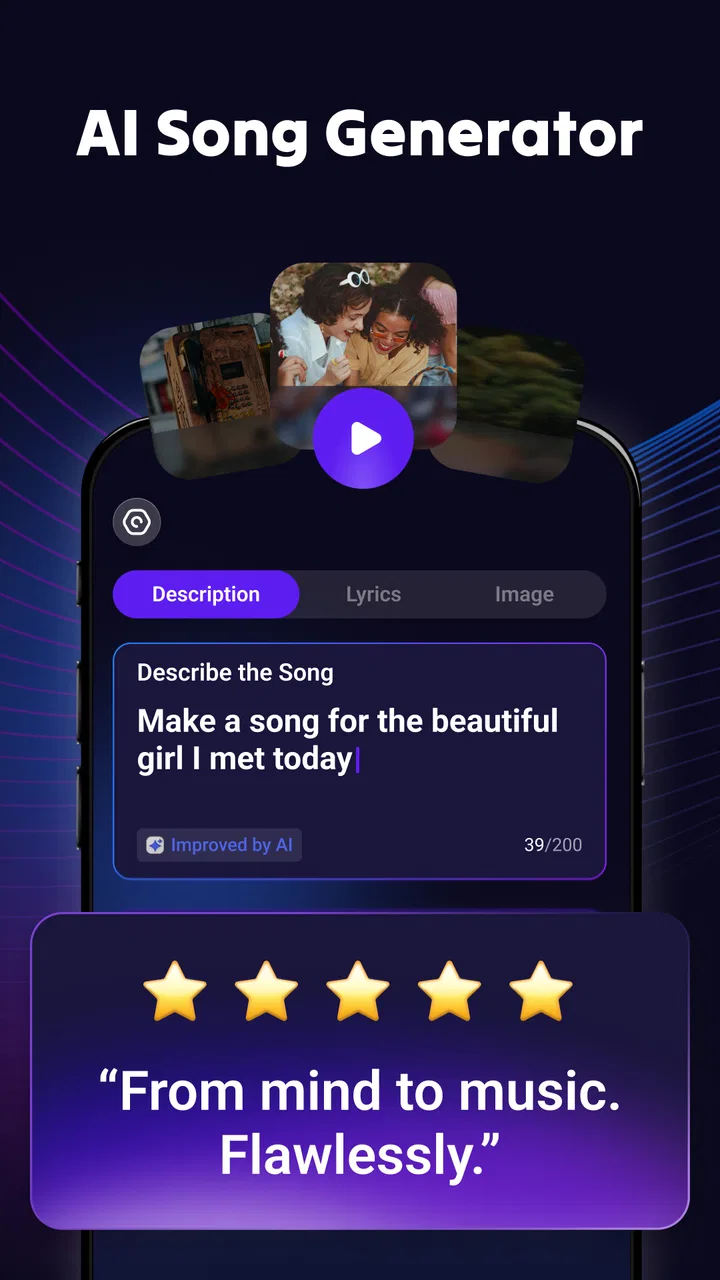
I approached Rythmix: AI Music & Song Maker as a quick creative tool rather than a replacement for a full music studio. It sits in the Music & Audio category and focuses on turning an idea into an AI-assisted song or music video, including cover-style creations and rap-oriented results. My first impression is that it is aimed at people who want to experiment immediately, without spending an evening learning a traditional digital audio workstation.
That makes it interesting for casual creators, short-form video makers, and anyone who enjoys trying unusual versions of familiar musical ideas. It is also important to set expectations early: an AI generator can help you explore a concept quickly, but speed is not the same as detailed control. If your goal is professional mixing, precise vocal editing, or complete ownership of every musical decision, a conventional audio workstation remains the better fit.
What Rythmix does well as an AI music playground
The core appeal is the short distance between an idea and an audible result. Instead of beginning with an empty timeline, I can approach a track from the angle of a concept: a genre, a mood, a vocal direction, or a cover experiment. That is useful when I know the kind of energy I want but do not yet have a melody, arrangement, or performance ready.
You May Also Like

 Blood Strike: 2.5 Anniversary
Blood Strike’s Loadouts Turn Every Drop Into a Tactical Gamble
A close look at Blood Strike’s custom loadouts: how fast access to signature weapons reshapes its battle royale rhythm, rewards preparation, and narrows the gap between fights.

 Pandora - Music & Podcasts
Pandora’s Music Is Easy to Start, but Harder to Recover
Pandora’s strength is its low-effort path from a seed to a station. Its weak spot is how much confidence it asks you to place in connection, setup, and quiet recovery.

 8 Ball Pool
 Is Built on Rivalries, Rematches, and Routine
A close look at the rivalries, rematches, shared routines, and unanswered safety questions that turn a quick pool match into a persistent mobile community.

 Samsung Music
’s Quiet Strength Is Playing What You Already Own
Its reach comes less from spectacle than from dependable access to a personal library. That simplicity is both the app’s strongest retention engine and its ceiling.

 AccuWeather: Weather Radar
AccuWeather Review: A Quick, Clear Forecast for Everyday Decisions
For everyday plans, the best forecast is the one you can understand quickly. AccuWeather makes rain timing, radar, and local conditions easy to act on, with a few trade-offs.

 Hill Climb Racing
Why Hill Climb Racing Still Turns Crashes Into One More Run
A tiny car, a bumpy hill and one more upgrade: Hill Climb Racing keeps resurfacing because its simple chaos makes every near-miss feel personal.
More From Our News Desk



The rap angle is especially practical for testing rhythm and attitude. A person writing a playful verse for friends, planning a social clip, or simply wondering how a familiar idea might sound in a different style can get more value here than from a standard player or streaming app. The music-video element also makes the experience broader than generating audio alone, because the result is intended to be something you can experience visually as well as musically.
I would describe the app as a creative sketchbook. It is best when I treat each generation as a starting point, not as a finished master. That mindset changes the experience considerably. A result that is not quite right may still reveal a better direction for a chorus, a funny contrast in style, or a useful mood for a video project.
One practical workflow is to begin with a very narrow purpose. Rather than asking for something vague and hoping the app guesses correctly, I would decide whether I want a short joke track, a rap experiment, background audio for a clip, or a cover-style reinterpretation. Keeping that goal clear makes it easier to judge the output and avoid wasting time generating ideas that do not serve a project.
Where the free access fits into the decision
Rythmix is free to install, which lowers the barrier to trying its basic experience. That matters for an app built around experimentation: I can test whether the style of generation suits me before deciding whether it deserves regular use. The age rating is Everyone, so its positioning is broad rather than limited to a specialist or mature audience.
The important cost detail is that the app also offers in-app purchases ranging from $5.99 to $99.99 per item. I would not treat the free installation as proof that every creative option is free. The sensible approach is to explore the accessible part first and only consider spending after I understand how often I would use the generator and whether the results are worth keeping.
This pricing range creates two very different value cases. For an occasional user who wants one amusing experiment, paying may not make sense at all. For someone who repeatedly creates songs or music videos and finds the workflow genuinely useful, a paid option could be easier to justify. The deciding factor is not the size of the app’s audience or its rating; it is whether the output saves enough time or adds enough enjoyment to become part of your routine.
I would also avoid assuming that the highest-priced purchase is automatically the best choice. AI creativity tools can be enjoyable during the first session and less compelling after the novelty fades. My advice is to use the free entry point as a trial period in the ordinary sense: make a few different kinds of creations, see how much control you have, and notice whether you return because you have a real use for it rather than because the first result was surprising.
What you can realistically use it for
A realistic everyday scenario would be preparing a short birthday video. I might have a few photos, a playful message, and no time to compose music from scratch. Rythmix could help me explore a humorous rap-style backing idea or a more dramatic musical treatment, giving the video a stronger identity than a generic background track. I would still review the result carefully before sharing it, because an AI-generated performance may not match the tone I imagined.
Another useful case is creative brainstorming. If I am writing lyrics or planning a character for a video, hearing an idea in a different musical direction can expose weaknesses that are difficult to notice on the page. A verse that feels lively when read may sound crowded when performed. A chorus that looks simple may need a stronger rhythmic shape. The app can therefore act as an audition space for concepts, even when I do not use the generated result in the final project.
It can also suit people who are curious about cover-style transformations. The attraction is not only hearing a song again, but comparing how its identity changes when the performance approach shifts. That said, I would be careful about treating generated covers as automatically suitable for public distribution. Creative enjoyment and publishing rights are separate questions, and the app’s convenience does not remove the need for responsible use of music and voices.
For social content, the strongest workflow is to generate with the final format in mind. A short clip needs an immediate musical idea; a long, slow introduction may be less useful than a compact section with a clear hook. I would create the visual concept first, then choose music that supports its pacing. This avoids the common mistake of making an interesting track and only afterward discovering that it does not fit the video.
Three details that make the experience easier to judge
First, I would separate experimentation from selection. Generate ideas freely at the beginning, but judge them later with a specific purpose in mind. A track can be technically interesting and still be wrong for a birthday message, a comedy clip, or a serious personal project. This simple separation helps prevent the app’s novelty from making every result seem better than it is.
Second, I would keep a small record of what worked in each attempt. When an AI result feels close but not quite right, the useful clue may be the combination of genre, mood, and vocal attitude rather than the whole output. Repeating the same broad request can lead to frustration; refining the concept around the strongest part is more productive. This is one reason I see Rythmix as a sketching tool: the value often comes from the direction it suggests.
Third, I would listen on more than one device before using a result publicly. A track that feels balanced through headphones may behave differently through a phone speaker or in a car. This is not a criticism unique to AI, but generated music can contain unusual vocal or instrumental details that are easy to miss in one listening environment. A quick second check can reveal distracting artifacts before they become part of a finished clip.
These habits also answer an important question: can the app replace a musician or producer? In my view, no. It can reduce the effort needed to explore a musical idea, but it does not give me the same deliberate control as recording a performance, editing MIDI, arranging sections, or mixing individual tracks. Its strength is accessibility and speed, not deep production precision.
How it compares with familiar alternatives
Compared with a streaming service, Rythmix is interactive rather than passive. A streaming app helps me discover and listen to finished music; this app is more useful when I want to make a personalized experiment. If I mainly want reliable playlists, offline listening, or a large catalog, a conventional music service is a better choice.
Compared with a digital audio workstation, Rythmix is much less intimidating for a first attempt. A workstation offers detailed editing and control, but that flexibility comes with a learning curve. I would choose Rythmix when the priority is getting an idea moving quickly, and a workstation when the priority is shaping every note, recording a real vocal, or preparing a carefully mixed release.
Compared with a basic beat-making app, its appeal is the AI-driven transformation and the focus on songs, covers, rap, and music-video concepts rather than only arranging loops. The trade-off is that a loop-based tool may feel more predictable. If I need exact tempo control, repeatable sections, or a clearly editable arrangement, a traditional beat maker may give me a more dependable process.
The app is developed by PROMINENT FORTUNE PTE. LTD. and has reached over a million installs. Its average rating is 4.0 from around twenty-two thousand ratings, with several hundred written reviews. Those figures suggest that the concept has attracted substantial interest, but I would read them as evidence of reach rather than a guarantee that every user will enjoy the same results. AI output is inherently personal: one person may love an unexpected vocal style while another may find it distracting.
Where the friction appears
The first limitation is control. When the result is close but not quite right, I may want to adjust one specific element without changing everything else. AI generation does not always behave like a traditional session where each part is independently editable. That can make refinement less predictable, especially for users who already know exactly how they want a track to sound.
The second limitation is consistency. A generated song can capture the requested mood while missing the emotional detail, pronunciation, timing, or performance character I had in mind. This is particularly relevant for personal messages. A birthday song that sounds technically polished but emotionally awkward may be less effective than a simple recording made by a friend.
The third is cost sensitivity. Because purchases range from a relatively small amount to a much larger one, I would pay close attention before confirming anything. The free starting point is valuable, but frequent generation can change the economics of the experience. Someone who only wants occasional amusement should be cautious about turning an experiment into an automatic purchase habit.
There is also a quality-control responsibility. I would not publish an AI-generated cover, voice-like performance, or music video without considering whether I have permission to use the underlying material and whether the presentation could mislead viewers. The app makes creation easier; it does not make every use legally or ethically uncomplicated.
Device compatibility is reasonably broad because the current version is 1.12.5 and the minimum operating system is Android 6.0. That makes it accessible to many Android users, although the experience can still vary with a phone’s performance, available storage, and connection conditions. I would leave room for processing and avoid judging the app solely on a single rushed attempt made while multitasking.
Who will get the most value
I think Rythmix is a good match for curious beginners, casual creators, and people who want to turn a rough musical idea into something listenable without studying production software first. It is also appealing for short-form creators who need a distinctive concept rather than another generic instrumental track. The strongest users will be comfortable treating AI as a collaborator that proposes possibilities, not as a machine that always follows instructions perfectly.
It may also suit families or friends looking for a light creative activity. Making a playful rap about an inside joke or imagining a familiar musical idea in a new style can be entertaining even when the result is not commercially useful. In that setting, the free entry point is especially helpful because the purpose is exploration, not building a professional catalog.
I would skip it if my main requirement is precise production control, dependable vocal realism, or a transparent editing workflow. A singer-songwriter who needs to record and tune a personal performance may be better served by a recording app. A producer who needs detailed arrangement and mixing tools should start with a digital audio workstation. Someone who only wants to listen to music should not install a generator expecting it to behave like a streaming service.
I would also skip paid use if I cannot name a recurring reason to create. The purchase range makes sense only when the app delivers repeated value in my own routine. A single amusing result is not enough reason for me to commit to the more expensive end of the purchase options.
My buy-or-skip verdict
My verdict is to try Rythmix for free if the idea of AI-generated songs, rap experiments, covers, or music videos genuinely appeals to you. It offers a friendly route into musical experimentation and can be more inspiring than staring at a blank project in a traditional studio. I especially like it for quick concepts, personal clips, and playful creative sessions where speed matters more than perfect control.
I would not recommend paying immediately. I would first test several different use cases, listen critically, and decide whether the results solve a real problem for me. The free installation makes that evaluation relatively straightforward, while the in-app purchase range means it is wise to keep spending connected to a clear purpose.
For me, the app’s value is strongest as an idea generator and weakest as a final-production environment. If you want an accessible way to hear imaginative versions of musical concepts, it is worth exploring. If you need exact editing, professional consistency, or a dependable replacement for musicians and studio software, I would skip the purchase and choose a more specialized tool instead.
FAQs for Rythmix: AI Music & Song Maker
01What features does Rythmix: AI Music & Song Maker offer?
Rythmix: AI Music & Song Maker offers a wide range of features, including AI-driven music composition, a library of sound packs, and user-friendly editing tools. The app allows you to create and customize tracks with ease, catering to both beginners and experienced musicians. Its intuitive interface makes music creation accessible to everyone.
02Is Rythmix suitable for beginners in music production?
Yes, Rythmix is designed to be beginner-friendly. The app provides step-by-step tutorials and an easy-to-navigate interface, making it simple for users with no prior experience to start creating music. The AI features assist in generating melodies and beats, helping beginners develop their skills as they explore the app.
03Does Rythmix require an internet connection to function?
While Rythmix can function offline for basic music creation, some features, such as downloading additional sound packs and accessing cloud storage, require an internet connection. Online access also allows users to share their creations with the community and update the app to the latest version.
04What are the pros and cons of using Rythmix?
The pros of Rythmix include its AI-driven music creation, user-friendly interface, and extensive sound library. However, some users may find the premium features locked behind a subscription, and the app's advanced functionalities might require a learning curve for complete utilization. Overall, it offers great value for music enthusiasts.
05How does Rythmix ensure privacy and data security?
Rythmix prioritizes user privacy and data security by adhering to strict data protection policies. The app requires minimal personal information for account creation and offers options to manage privacy settings. Additionally, it employs encryption protocols to safeguard user data, ensuring a secure environment for music creation.
Pros
- Intuitive interface for easy navigation
- Wide variety of sound effects available
- AI-assisted composition feature
- Supports multiple file formats
- Regular updates with new features
Cons
- Limited free version capabilities
- Occasional lag on older devices
- Requires internet for full features
- Some features need in-app purchases
- Interface can be overwhelming initially

Rythmix: AI Music & Song Maker
Gallery